Audio Driving Instructions Cannot Be Heard
Symptom TroubleshootingAudio driving instructions cannot be heard ('03 Model)
1. Push the display unit MENU key, and select "setup".
2. Check the audio driving instructions volume setting.
Is sit set to OFF?
YES - Set the volume to an audible level.
NO - Go to step 3.
3. Turn the ignition switch OFF.
4. Disconnect the navigation unit connector B (16P), audio unit 20P connector, and onstar system interface unit connector A (12P).
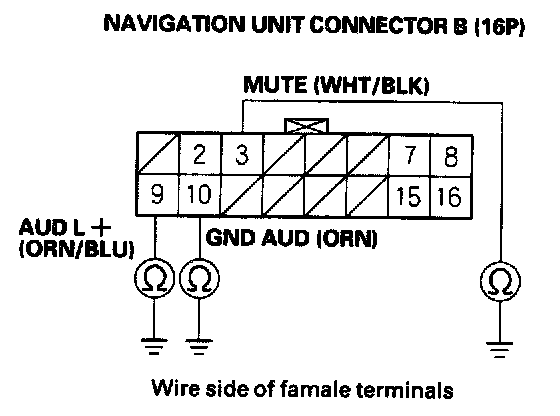
5. Check for continuity between body ground and navigation unit connector B (16P) terminals No. 3, No. 9, and No. 10 individually.
Is there continuity?
YES - If terminal No. 3 has continuity to ground, repair the short to body ground in the WHT/BLK wire.
If terminal No. 9 or No. 10 have continuity to ground, replace the affected shielded harness.
NO - Go to step 6.
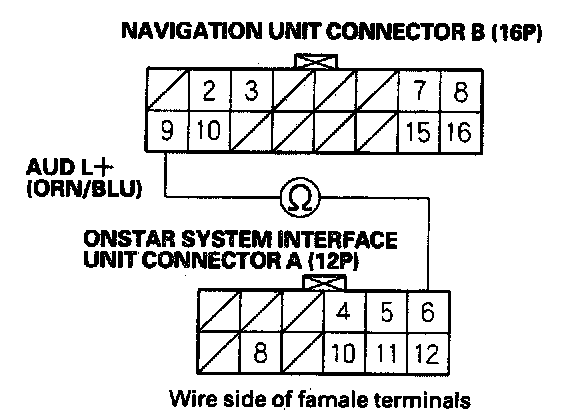
6. Check for continuity between navigation unit connector B (16P) terminal No. 9 and the onstar system interface unit connector A (12P) terminal No. 6.
Is there continuity?
YES - Go to step 7.
NO - There is an open in the circuit between the navigation unit and the onstar system interface unit. Replace the affected shielded harness.
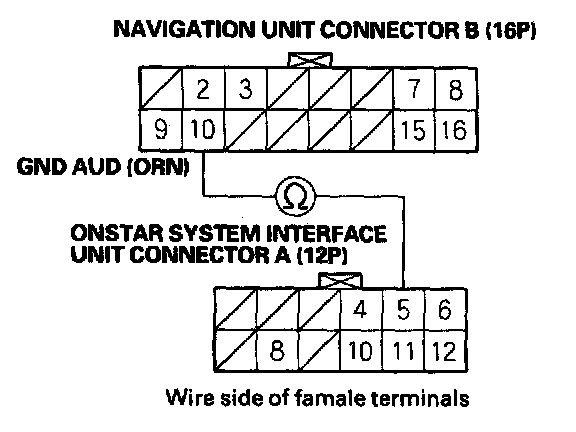
7. Check for continuity between navigation unit connector B (16P) terminal No. 10 and the onstar system interface unit connector A (12P) terminal No. 5.
Is there continuity?
YES - Go to step 8.
NO - There is an open in the circuit between the navigation unit and onstar system interface unit. Replace the affected shielded harness.
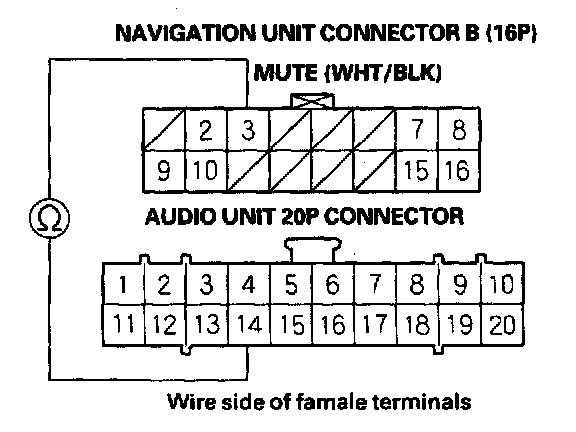
8. Check for continuity between navigation unit connector B (16P) terminal No. 3 and the audio unit 20P connector terminal No. 14.
Is there continuity?
YES - Go to step 9.
NO - Repair open in the wire between the navigation unit and the audio unit.
9. Disconnect the navigation unit connector A (12P) and amplifier unit 26P connector.
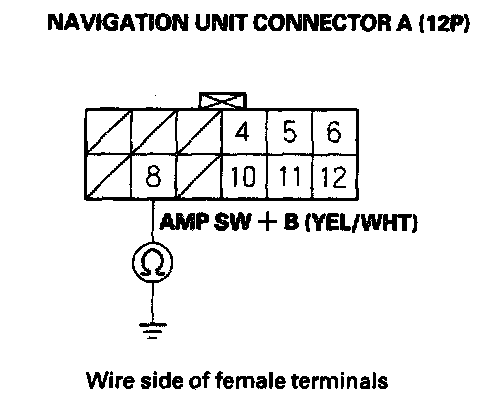
10. Check for continuity between navigation unit connector A (12P) terminal No. 8 and body ground.
Is there continuity?
YES - Repair short to body ground in the wire between the navigation unit, the audio unit, and the amplifier unit.
NO - Go to step 11.
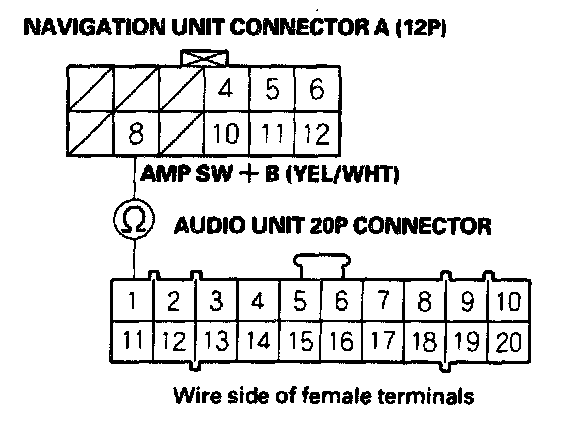
11. Check for continuity between navigation unit connector A (12P) terminal No. 8 and the audio unit 20P connector terminal No. 1.
Is there continuity?
YES - Go to step 12.
NO - Repair open in the wire between the navigation unit and the audio unit.
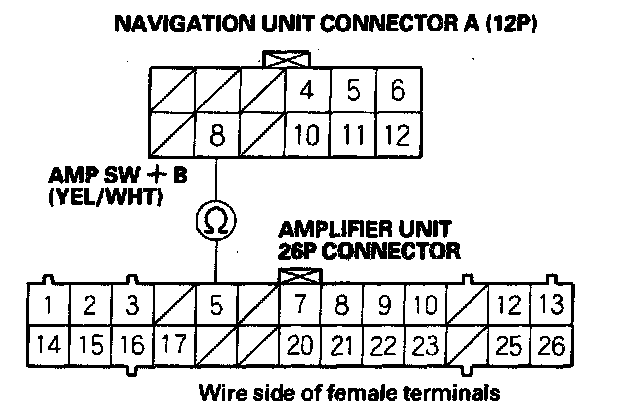
12. Check for continuity between navigation unit connector A (12P) terminal No. 8 and the amplifier unit 26P connector terminal No. 5.
Is there continuity?
YES - Go to step 13.
NO - Repair open in the wire between the navigation unit and the amplifier unit.
13. Substitute a known-good audio unit, and recheck.
Is the system OK?
YES - Replace the audio unit.
NO - Go to step 14.
14. Substitute a known-good amplifier unit, and recheck.
Is the system OK?
YES - Replace the amplifier unit.
NO - Replace the navigation unit.