Installation
NAVIGATION / MULTI INFO DISPLAY: HARD DISK DRIVE: INSTALLATION
1. PRECAUTION
NOTICE:
When installing the hard disk drive, eliminate static electricity by touching the vehicle body to prevent components from being damaged.
2. INSTALL HARD DISK DRIVE
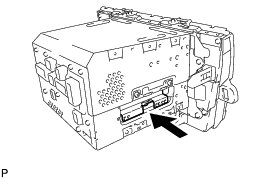
(a) Insert the hard disk drive in the direction shown by the arrow in the illustration to install it.
(b) Engage the 2 guides to temporarily install the cover.
(c) Install the cover with the 2 screws.
3. INSTALL NO. 2 RADIO BRACKET Installation
4. INSTALL NAVIGATION RECEIVER WITH BRACKET Installation
5. INSTALL UPPER INSTRUMENT PANEL FINISH PANEL SUB-ASSEMBLY Installation
6. INSTALL INSTRUMENT CLUSTER FINISH PANEL GARNISH Installation
7. INSTALL LOWER CENTER INSTRUMENT CLUSTER FINISH PANEL SUB-ASSEMBLY Installation
8. INSTALL INTEGRATION CONTROL AND PANEL ASSEMBLY Installation
9. CONNECT CABLE TO AUXILIARY BATTERY NEGATIVE TERMINAL
NOTICE:
When disconnecting the cable, some systems need to be initialized after the cable is reconnected Repair Instruction - Initialization.
10. INSTALL REAR NO. 3 FLOOR BOARD UPPER PLATE Installation
11. INSTALL DECK FLOOR BOX RH Installation
12. INSTALL REAR NO. 3 FLOOR BOARD Installation
13. INSPECT HARD DISK DRIVE
Operation Check