Performing Adaptation In Various Adaptation Channels Except 08 and 81
Performing Adaptation in Various Adaptation Channels Except 08 and 81
- Query the DTC memory of the Climatronic control module (J255) A/C control head. Refer to => [ DTC Memory, Interrogating ] DTC Memory, Interrogating and erase any displayed faults.
- Check the coding of the Climatronic control module (J255) A/C control head with respect to vehicle-related optional equipment and correct as needed. Refer to => [ A/C Control Head Climatronic Control Module, Coding ] A/C Control Head Climatronic Control Module, Coding.
Indication on the display of the Vehicle Diagnosis, Testing and Information System (VAS 5051A):
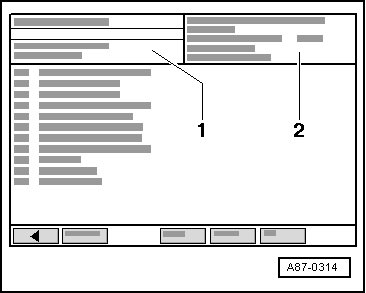
- Select function "10 - Adaptation".
Indication on the display of the Vehicle Diagnosis, Testing and Information System (VAS 5051A):
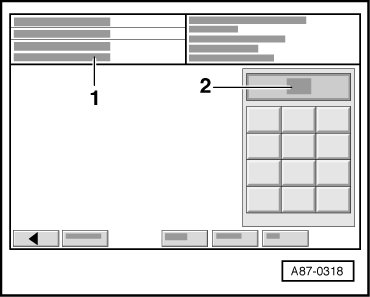
• Display field - 1 - indicates request to input channel number.
• Display field - 2 - shows an input keyboard.
- Enter the desired channel number in display field - 2 - via the keyboard. Refer to => [ Designated Adaptation Channels Overview ] (overview of designated adaptation channels) and confirm by pressing the Q button.
• If "Function unknown or cannot be carried out at the moment" is displayed in display field - 1 -, the following may be the cause:
• - Control module adaptation neither as specified nor complete
• - Fault in comfort data bus system.
Indication on display of Vehicle Diagnosis, Testing and Information System (VAS 5051A):
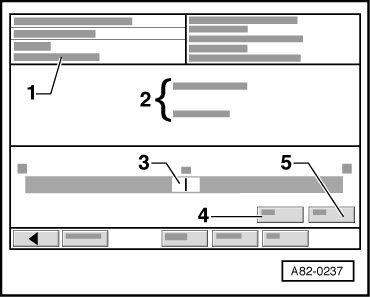
• Display field - 1 - indicates "Channel X read and test".
• In area - 2 -, the currently adjusted value for this function is displayed.
• Area - 3 - displays scroll bar with an identification number for currently valid setting.
- The adjustment can be changed within the determined limits via the scroll bar.
• If an identification number is entered via scroll bar that is outside the determined limits, identification number is shown but will not be implemented.
• If an identification number which is too large or too small is entered via scroll bar, the display changes back automatically.
• Area - 2 - displays newly set value for this adaptation channel.
Entry can also be made by way of keypad.
- Touch button - 4 - (input via keyboard)
Indication on display of Vehicle Diagnosis, Testing and Information System (VAS 5051A):
• Display field - 1 - indicates display "Enter adaptation value: 0....XXXXX".
• Display field - 2 - shows input keyboard.
- Use the keyboard to enter the desired value for this adaptation channel in the display field. Refer to => [ Designated Adaptation Channels Overview ] (overview of designated adaptation channels) for the new adaptation of the Climatronic control module (J255) A/C control head.
• If an identification number is entered via keyboard that is outside the determined limits, identification number is shown but will not be implemented.
• If an identification number which is too large or too small is entered via the keyboard, the display changes back automatically.
• Area - 2 - displays entered identification number.
- Press "Q- button" to confirm input.
Indication on display of Vehicle Diagnosis, Testing and Information System (VAS 5051A):
• Area - 2 - displays new value for this adaptation channel.
• Area - 3 - displays entered characteristic number above scroll bar.
- Save input by touching button - 5 -.
Indication on display of Vehicle Diagnosis, Testing and Information System (VAS 5051A):
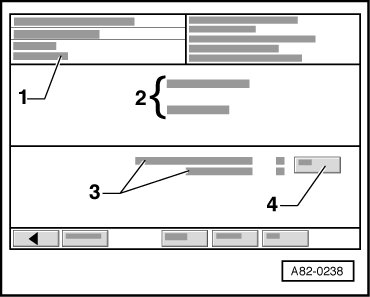
• Display field - 1 - indicates "Channel X read and test".
• Area - 2 - displays new value for this adaptation channel.
• Area - 3 - displays original and new identification number for this adaptation channel.
- Accept and save input by touching button - 4 -.
• Display field - 1 - indicates "Channel X save, value 0 - XXXX saved".
• If an identification number that is outside the determined limits was entered, identification number is shown but will not be implemented.
• If an identification number which is too large or too small was entered, the display changes back automatically.
• By clicking the <- button, you will return to the selection menu.
- End On Board Diagnostic (OBD). Refer to => [ Ending Output ] Erasing DTC Memory, Ending Output and switch ignition off.
- Check function of the new, entered adaptation.