Navigation System With CD Drive Control Module (J401)
Navigation System with CD Drive Control Module (J401)
Special tools, testers and auxiliary items required
• Radio Removal Tool (T10057)
• Protective Cap For Cable Connector (VAS 6223/9)
Navigation System with CD Drive Control Module is located in luggage compartment beneath the flap on the right
- Switch off all electrical consumers.
- Remove the key.
- If control module is replaced, select "Replacement" function for appropriate control module in "Guided Fault-Finding" routine.
Use the Vehicle Diagnosis, Testing and Information System (VAS 5051) to do so.
Removing
- Remove floor panel and recess in luggage compartment.
- Insert two clips of (T10057) into release slots of Navigation System with CD Drive Control Module until they engage. Points on the grip eyelets of tool face outward.
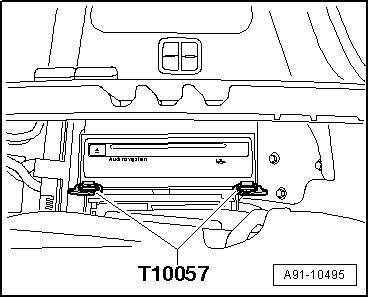
- Pull Navigation System with CD Drive Control Module out of mounting frame.
- Disconnect all connectors at Navigation System with CD Drive Control Module.
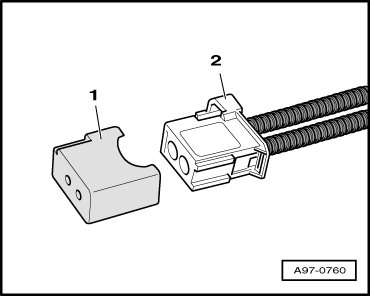
- Attach the (VAS 6223/9) - 1 - onto the MOST-Bus connector - 2 -.
- Remove (T10057) by pressing locking tabs on Navigation System with CD Drive Control Module.
Installing
- Connect harness connectors.
- Slide Navigation System with CD Drive Control Module in until it engages in mounting frame.