Part 2
Diagnostic Modes 01 - 09
- Check specified values at idle.

- If any of components or systems fail to meet the specified values. Refer to Diagnostic "Mode 03: Interrogating Fault Memory" to check for stored DTC or the corresponding diagnostic repair procedure => [ Diagnostic Mode 03 - Read DTC Memory ].
- Switch the ignition off.
Monitor-ID 66 ($42): Oxygen Sensor Heater Monitor Bank 1 - Sensor 2
- Connect the scan tool.
- Start the engine and run at idle.
- Select "Mode 6: Check test the results of components that are not continuously monitored".
Select "Monitor-ID 66 ($42)".
- Select the desired "Test-ID (TID)" or "Hex-ID".
- Check specified values at idle.

- If any of components or systems fail to meet the specified values. Refer to Diagnostic "Mode 03: Interrogating Fault Memory" to check for stored DTC or the corresponding diagnostic repair procedure => [ Diagnostic Mode 03 - Read DTC Memory ].
- Switch the ignition off.
Monitor-ID 70 ($46): Oxygen Sensor Heater Monitor Bank 2- Sensor 2
- Connect the scan tool.
- Start the engine and run at idle.
- Select "Mode 6: Check test the results of components that are not continuously monitored".
Select "Monitor-ID 70 ($46)".
- Select the desired "Test-ID (TID)" or "Hex-ID".
- Check specified values at idle.

- If any of components or systems fail to meet the specified values. Refer to Diagnostic "Mode 03: Interrogating Fault Memory" to check for stored DTC or the corresponding diagnostic repair procedure => [ Diagnostic Mode 03 - Read DTC Memory ].
- Switch the ignition off.
Monitor-ID 69 ($45): Oxygen Sensor Heater Monitor Bank 2- Sensor 1
- Connect the scan tool.
- Start the engine and run at idle.
- Select "Mode 6: Check test the results of components that are not continuously monitored".
Select "Monitor-ID 69 ($45)".
- Select the desired "Test-ID (TID)" or "Hex-ID".
- Check specified values at idle.

- If any of components or systems fail to meet the specified values. Refer to Diagnostic "Mode 03: Interrogating Fault Memory" to check for stored DTC or the corresponding diagnostic repair procedure => [ Diagnostic Mode 03 - Read DTC Memory ].
- Switch the ignition off.
Monitor-ID 113 ($71): Secondary air system ((Bank 1))
- Connect the scan tool.
- Start the engine and run at idle.
- Select "Mode 6: Check test the results of components that are not continuously monitored".
Select "Monitor-ID 113 ($71)".
- Select the desired "Test-ID (TID)" or "Hex-ID".
- Check specified values at idle.

- If any of components or systems fail to meet the specified values. Refer to Diagnostic "Mode 03: Interrogating Fault Memory" to check for stored DTC or the corresponding diagnostic repair procedure => [ Diagnostic Mode 03 - Read DTC Memory ].
- Switch the ignition off.
Monitor-ID 114 ($72): Secondary air system ((Bank 2)
- Connect the scan tool.
- Start the engine and run at idle.
- Select "Mode 6: Check test the results of components that are not continuously monitored".
Select "Monitor-ID 114 ($72)".
- Select the desired "Test-ID (TID)" or "Hex-ID".
- Check specified values at idle.

- If any of components or systems fail to meet the specified values. Refer to Diagnostic "Mode 03: Interrogating Fault Memory" to check for stored DTC or the corresponding diagnostic repair procedure => [ Diagnostic Mode 03 - Read DTC Memory ].
- Switch the ignition off.
Monitor-ID A2 : Mis-Fire Cylinder 1 Data
- Connect the scan tool.
- Start the engine and run at idle.
- Select "Mode 6: Check test the results of components that are not continuously monitored".
Select "Monitor-ID A2".
- Select the desired "Test-ID (TID)" or "Hex-ID".
- Check specified values at idle.

- If any of components or systems fail to meet the specified values. Refer to Diagnostic "Mode 03: Interrogating Fault Memory" to check for stored DTC or the corresponding diagnostic repair procedure => [ Diagnostic Mode 03 - Read DTC Memory ].
- Switch the ignition off.
Monitor-ID A3: Mis-Fire Cylinder 2 Data
- Connect the scan tool.
- Start the engine and run at idle.
- Select "Mode 6 Check test the results of components that are not continuously monitored".
Select "Monitor-ID A3:".
- Select the desired "Test-ID (TID)" or "Hex-ID".
- Check specified values at idle.

- If any of components or systems fail to meet the specified values. Refer to Diagnostic "Mode 03: Interrogating Fault Memory" to check for stored DTC or the corresponding diagnostic repair procedure => [ Diagnostic Mode 03 - Read DTC Memory ].
- Switch the ignition off.
Monitor-ID A4: Mis-Fire Cylinder 3 Data
- Connect the scan tool.
- Start the engine and run at idle.
- Select "Mode 6: Check test the results of components that are not continuously monitored".
Select "Monitor-ID A4".
- Select the desired "Test-ID (TID)" or "Hex-ID".
- Check specified values at idle.

- If any of components or systems fail to meet the specified values. Refer to Diagnostic "Mode 03: Interrogating Fault Memory" to check for stored DTC or the corresponding diagnostic repair procedure => [ Diagnostic Mode 03 - Read DTC Memory ].
- Switch the ignition off.
Monitor-ID A5 : Mis-Fire Cylinder 4 Data
- Connect the scan tool.
- Start the engine and run at idle.
- Select "Mode 6: Check test the results of components that are not continuously monitored".
Select "Monitor-ID A5".
- Select the desired "Test-ID (TID)" or "Hex-ID".
- Check specified values at idle.

- If any of components or systems fail to meet the specified values. Refer to Diagnostic "Mode 03: Interrogating Fault Memory" to check for stored DTC or the corresponding diagnostic repair procedure => [ Diagnostic Mode 03 - Read DTC Memory ].
- Switch the ignition off.
- If any of the components or systems fail to meet the specified values, refer to Diagnostic Mode 03: Interrogating Fault Memory to check for stored DTCs or the corresponding diagnostic repair procedure.
- Switch the ignition off.
Monitor-ID A6 : Mis-Fire Cylinder 5 Data
- Connect the scan tool.
- Start the engine and run at idle.
- Select "Mode 6: Check test the results of components that are not continuously monitored".
Select "Monitor-ID A6".
- Select the desired "Test-ID (TID)" or "Hex-ID".
- Check specified values at idle.

- If any of components or systems fail to meet the specified values. Refer to Diagnostic "Mode 03: Interrogating Fault Memory" to check for stored DTC or the corresponding diagnostic repair procedure => [ Diagnostic Mode 03 - Read DTC Memory ].
- Switch the ignition off.
- If any of the components or systems fail to meet the specified values, refer to Diagnostic Mode 03: Interrogating Fault Memory to check for stored DTCs or the corresponding diagnostic repair procedure.
Monitor-ID A7 : Mis-Fire Cylinder 6 Data
- Connect the scan tool.
- Start the engine and run at idle.
- Select "Mode 6: Check test the results of components that are not continuously monitored".
Select "Monitor-ID A7".
- Select the desired "Test-ID (TID)" or "Hex-ID".
- Check specified values at idle.

- If any of components or systems fail to meet the specified values. Refer to Diagnostic "Mode 03: Interrogating Fault Memory" to check for stored DTC or the corresponding diagnostic repair procedure => [ Diagnostic Mode 03 - Read DTC Memory ].
- Switch the ignition off.
- If any of the components or systems fail to meet the specified values, refer to Diagnostic Mode 03: Interrogating Fault Memory to check for stored DTCs or the corresponding diagnostic repair procedure.
Diagnostic Mode 07 - Read Faults Detected During the Current or Last Driving Cycle
Mode 07 makes it possible to check emissions-related faults which appeared during the current or last driving cycle (pending DTCs).
A pending DTC is saved the first time a fault is detected (output via Mode 07).
- If the fault is detected again by the end of the following driving cycle, a confirmed DTC is entered (output via Mode 03) and the MIL is activated.
- If this malfunction is not detected again by the end of the following driving cycle, the corresponding pending code will be deleted at the end of the driving cycle.
• Depending on scan tool and protocol used, some of the information provided may be referred to by a different name.
Procedure
- Connect the scan tool.
- Start the engine and run at idle.
• If the engine does not start, crank the engine using starter for at least 5 seconds. Do not switch the ignition off afterward.
- Select Mode 7: Check test results of components that are continuously monitored.
The number of pending DTCs or 0 malfunctions detected will be displayed on the scan tool screen.
- Refer to the DTC tables for the diagnostic repair procedures.
- Switch the ignition off.
Diagnostic Mode 08 - Request Control of On-Board System, Test or Component
Diagnostic Mode 08 is used to control the operation of an on-board system, test or component. A Mode 8 service can be used to turn on-board system ON or OFF, or to cycle an on-board system, test or component on or off for a specific period of time. The service can also be used to request system status or to report test results.
Test requirements
• No DTCs stored in the DTC memory.
• Intake Air Temperature (IAT) maximum 60 °C.
• Coolant temperature 80 -110 °C.
• Throttle valve angle 12.0 - 16.0%.
Function test
• If the accelerator pedal is depressed during the test, the test will be aborted.
- Connect the scan tool.
- Start the engine and run at idle for at least 15 minutes.
- Select "Mode 8: Tank Leak Test".
- Select "Test-ID 01: Tank Leak Test".
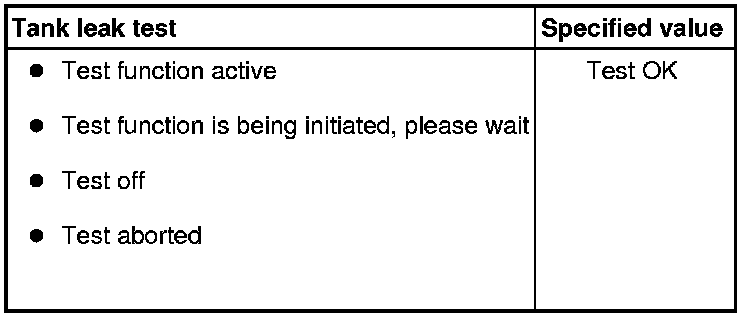
- Check the specified value of the tank leak test at idle.
- The following will be displayed on the scan tool screen:
- Switch the ignition off.
If the specified result is obtained:
System OK.
If the specified result is not obtained:
- Repeat the tank leak test, switch the ignition off and start the engine again and let run for 15 minutes at idle.
- Switch the ignition off.
If the specified result is again not obtained:
- A leak may be present. Refer to => [ Evaporative System, Checking for Leaks ] Evaporative System, Checking for Leaks.
Diagnostic Mode 09 - Read Vehicle Information
Diagnostic Mode 09 makes it possible to access vehicle-specific information from the ECM and the TCM (where applicable).
• Depending on scan tool and protocol used, Diagnostic Mode 09 and the information provided may be referred to by a different name.
Test requirement
• No DTCs stored in the DTC memory.
Procedure
- Connect the scan tool.
- Switch the ignition on.
- Select Mode 09: Vehicle information.
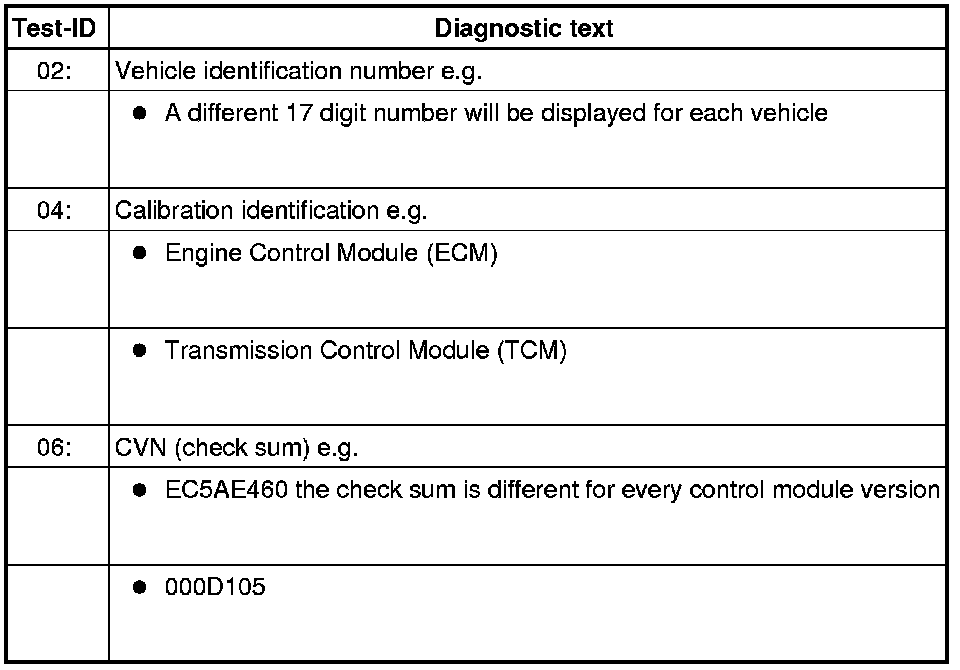
- Select the desired Test-ID.
- The information requested will be displayed on the scan tool screen.
The following table is a numerical list of all Test-IDs that may be selected.
- Switch the ignition off.