Dynamic Steering Basic Setting
Dynamic Steering Basic Setting
Special tools, testers and auxiliary items required
• Steering Wheel Scales (VAS 6458)
• Vehicle Diagnostic Tester with diagnostic cable
• Wheel Alignment Computer
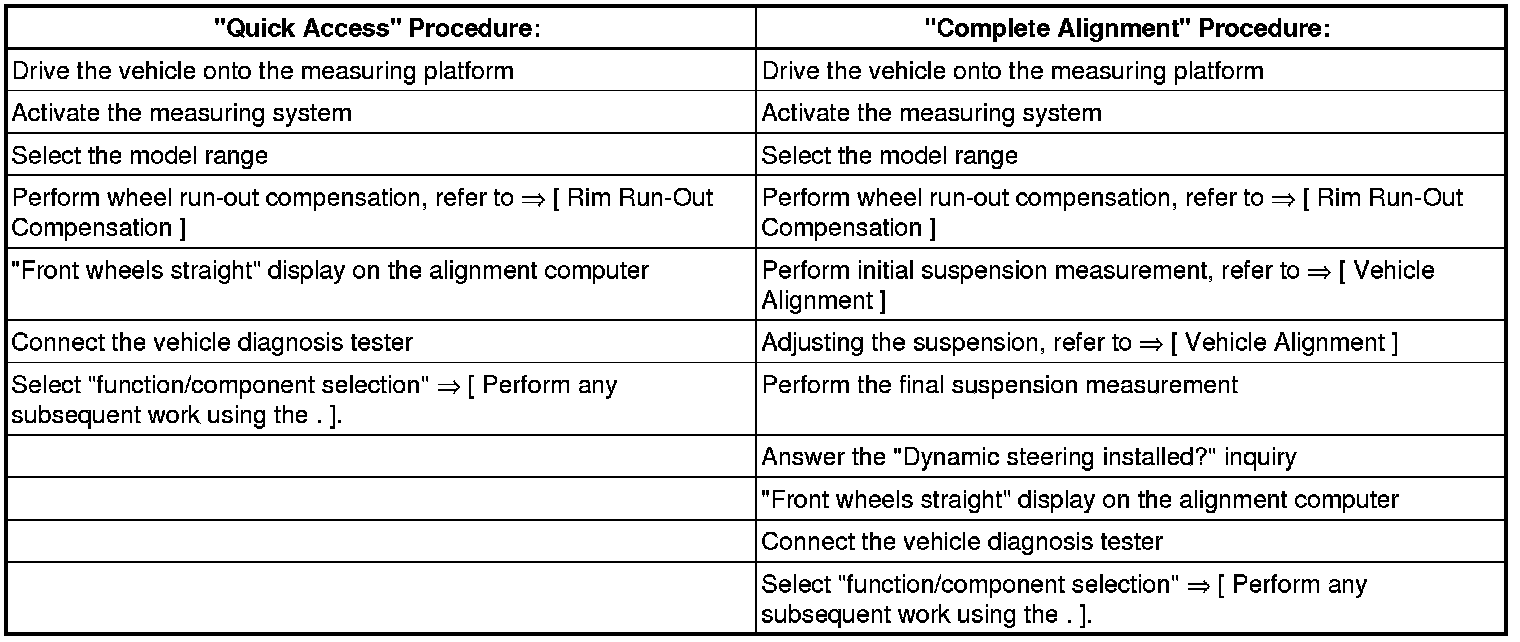
There are two choices for performing a basic setting on the dynamic steering:
The "Quick Access"
This procedure should be selected for the following activities if only the basic setting will be performed.
• The active steering control module (J792) was replaced,
• The steering angle sensor (G85) was calibrated,
• The steering column was replaced,
• The steering wheel is at an angle when driving straight.
The "Complete Alignment"
This procedure should be selected for the following activities if a basic setting and a suspension adjustment will be performed.
• The front axle toe was adjusted,
• The rear axle toe was adjusted,
• The vehicle suspension was changed, for example, changing from standard to sport suspension.
• Both procedures are programmed into the axle alignment computer.
• The respective procedure is performed automatically.
• It is only necessary to select the appropriate program for the procedure that will be performed.
• A basic setting to the steering angle sensor (G85) must be made using the (VAS 6458) before beginning the calibration.
Preparation work for calibrating and adjusting driver assist systems, refer to => [ Preparation Work for Calibrating and Adjusting Driver Assist Systems ] Preparation Work for Calibrating and Adjusting Driver Assist Systems.
- Select the basic setting procedure for dynamic steering in the alignment computer.
- Install the quick clamps on all four wheels.
- Install the measurement sensors on the front and rear wheels.
- Perform wheel run-out compensation. Refer to => [ Rim Run-Out Compensation ] Service and Repair.
• Disregard the steering wheel position when doing this.
• Only the display on the alignment computer is valid.
Perform any subsequent work using the vehicle diagnostic tester.
- Turn ignition on.
- Touch Guided Fault Finding on the touch screen.
- Select the following in this order:
• Brand
• Model
• Model year
• Version
• Engine code
- Confirm the entered data.
Wait until the vehicle diagnostic tester has checked all the vehicle control module.
- Press the GO TO button and select "function/component selection".
- Select the program in "Guided Functions".
Follow the instructions on the screen to perform the basic setting.