Brake Pedal Replacement
Brake Pedal Replacement
1. Remove the driver's dashboard undercover Driver's Dashboard Undercover Removal / Installation.
2. Disconnect the brake pedal position switch connector (A).
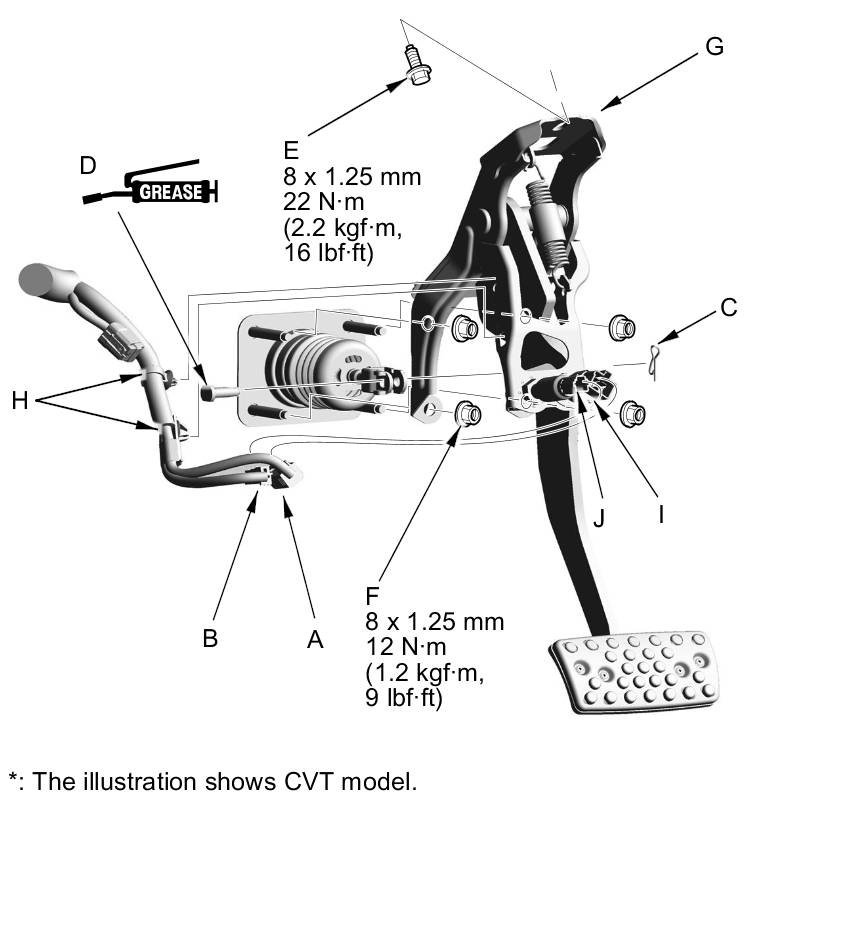
3. CVT model: Disconnect the idle stop switch connector (B).
4. Remove the lock pin (C) and clevis pin (D).
NOTE: During installation, apply multipurpose grease to the clevis pin in the brake pedal.
5. Remove the brake pedal mounting bolt (E) and the brake booster/brake pedal mounting nuts (F).
6. Remove the brake pedal with bracket (G).
7. Remove the clip (H) from the brake pedal bracket.
8. Remove the brake pedal position switch (I) by turning it 45° counterclockwise.
9. CVT model: Remove the idle stop switch (J) by turning it counterclockwise.
10. Install the brake pedal in the reverse order of removal.
11. Do the brake pedal and brake pedal position switch/idle stop switch adjustment Adjustments.