Brakes - MIL ON/DTC C1801 Set
XJ206-06DATE
11/05
XJ range
Electric Parking Brake (EPB) MIL On/DTC
C1801 Mis-routed Cable
Repair Procedure
MODEL
2005-06 MY
XJ range
VIN
G48571-H00019
Issue:
Some 2005-06 MY XJ range vehicles within the above VIN range, may experience concerns of the EPB MIL coming "ON" with the possibility of DTC C1801 being stored.
This condition can be caused by the left-hand side EPB cable being mis-routed.
Action:
In case of a customer complaint of the above condition on a 2005-06 MY XJ range vehicle within the above VIN range, re-route the left-hand side EPB cable and clear the DTCs.
Follow the Service Instruction outlined below.
REPAIR PROCEDURE
1. Remove left rear wheel (see Global Technical Reference GTR Workshop Manual, section: 204-04).
2. Release EPB cable tension (see Global Technical Reference GTR Workshop Manual, section: 206-05).
3. Reposition left-hand parking brake caliper lever.
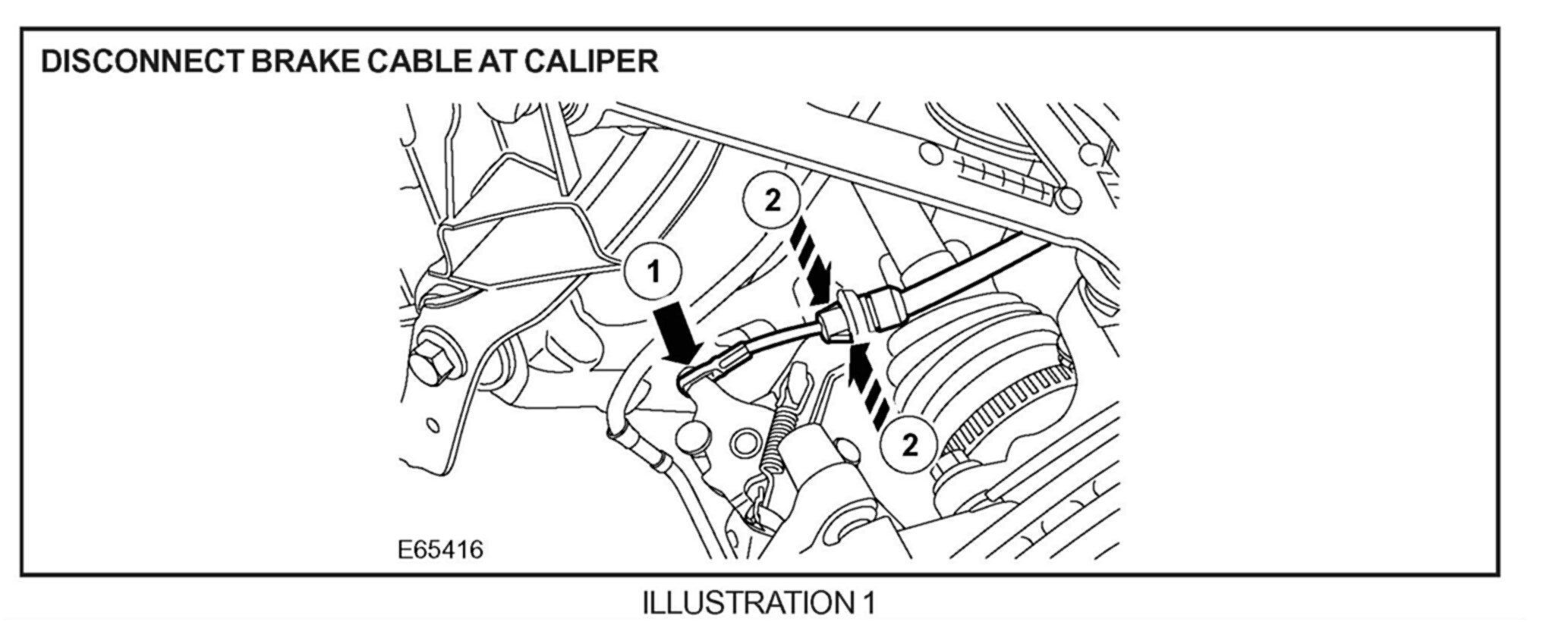
4. Disconnect cable from parking brake lever (1, Illustration 1), release clips and disconnect outer cable from left-hand brake caliper (2).
5. Disconnect the cable from the connector bracket.
6. Release clips and remove cable from mounting bracket).
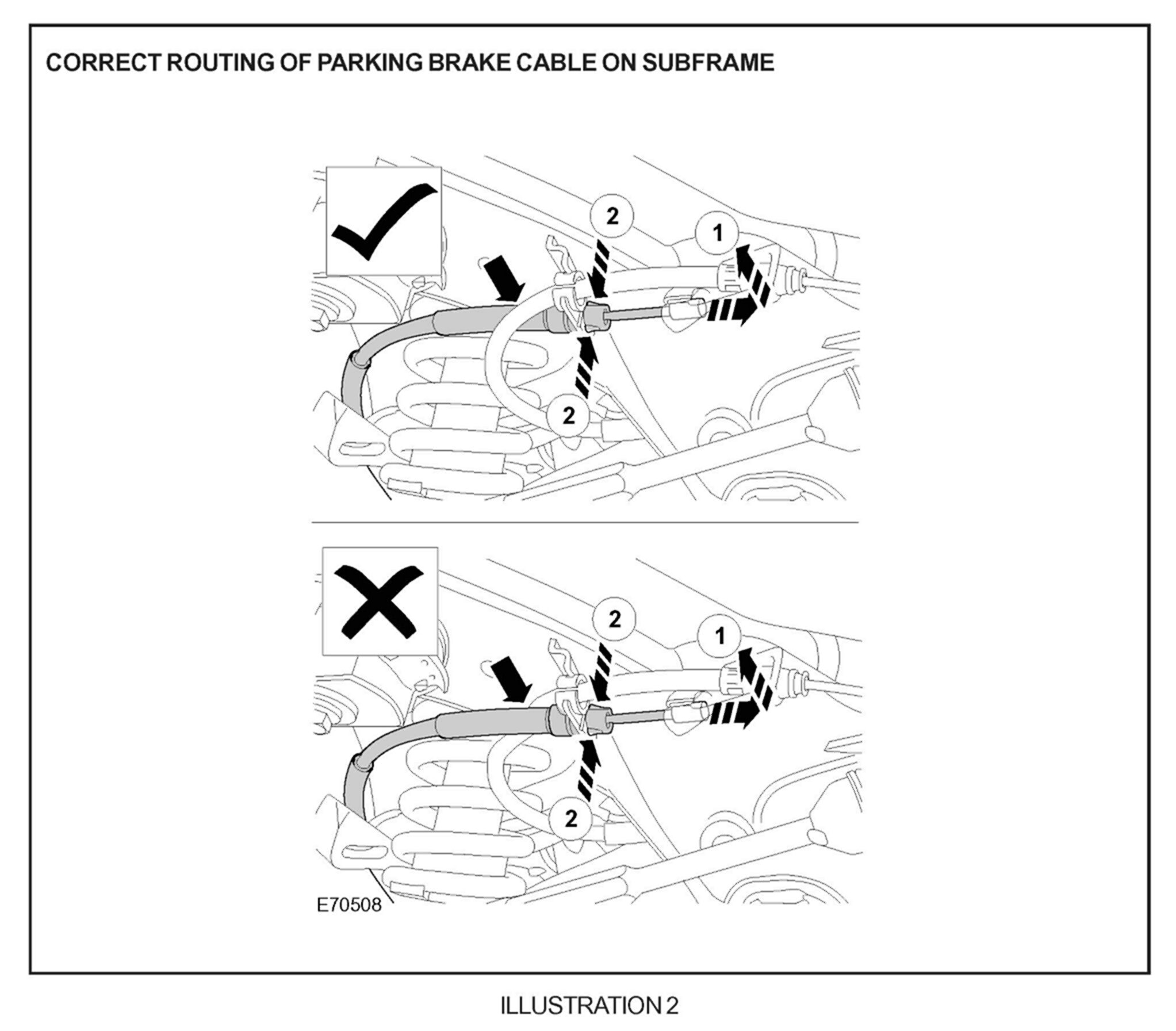
Note:
The left-hand park brake cable must be routed on top of the main cable, so that the protective sleeve rests against the rear subframe (Illustration 2.)
7. Secure cable to mounting bracket with clips.
8. Secure inner cable to connector bracket.
9. Secure cable to caliper with clips.
10. Secure cable to the parking brake lever.
11. Install left rear wheel (see Global Technical Reference GTR Workshop Manual, section: 204-04).
12. Start engine.
13. Apply footbrake firmly, repeat five times.
14. Confirm that the message "NOT CALIBRATED" is displayed on the message center.
15. Apply footbrake lightly and hold in "down" position.
16. Apply parking brake using EPB switch.
17. Release parking brake.
18. Release footbrake.
19. Confirm brake warning lamp is not illuminated and that "NOT CALIBRATED" is no longer displayed in the message center.
20. Apply and release the EPB five times, to ensure no error is present.
IF DTC C1801 IS STORED
Note:
Ensure WDS is loaded with software release JTP 759/41 or later.
21. Connect PTU to the vehicle diagnostic connector.
22. Navigate and clear DTCs.
23. Switch "OFF" PTU, disconnect from vehicle and return WDS to original location.

Parts Information:
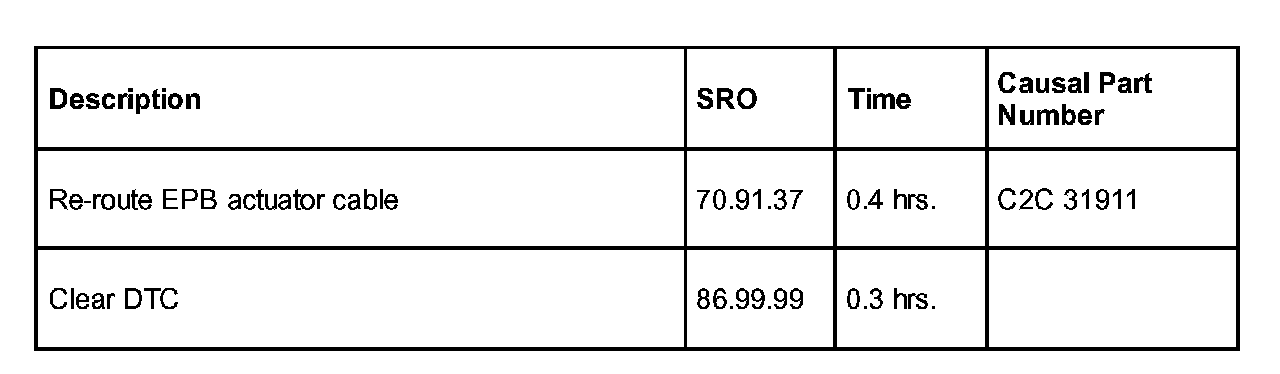
Warranty Information:
Warranty claims should be submitted quoting the information found in the table. This will result in payment of the stated time and, where applicable parts/miscellaneous expense codes as listed.
Note:
Repair procedures are under constant review, and therefore repair times are subject to change. The times quoted here must be taken as guidance only. Always refer to DDW to obtain the latest repair time.

Disclaimer