Recall - Instrument Cluster Speaker Functionality
NUMBER J011(Issue 2)
MODEL XF
DATE 24 MAR 2009
ISSUE '2' CHANGES ARE HIGHLIGHTED WITH GRAY BACKGROUND
SECTION: 413
SAFETY RECALL J011: Instrument Cluster Speaker Function

AFFECTED VEHICLE RANGE
CONDITION SUMMARY:
Situation:
The instrument cluster speaker wires may fracture as a consequence of an overly aggressive "tick-tock" sound wave form, the volume of which is vehicle speed dependent. At higher vehicle speeds the wave form has an amplitude which aggravates the condition where the speaker wires could fail.
In the event of a speaker failure, the following audible notifications will cease to function:
^ Directional indicators
^ Seat belt warning
^ Lights 'on' warning
^ Driver's door open with ignition 'on'
^ Driver intervention (Adaptive Cruise Control equipped vehicles only)
^ Seat memory
NOTE:
The software update is to prevent instrument cluster speaker failure only. Should there be any other concerns with the instrument cluster speaker, diagnose and if required repair following normal procedures separate from this Recall action.
Action:
Dealers are required to verify instrument cluster speaker functions correctly and without distortion and reconfigure the instrument cluster as per the Repair Procedure outlined below.
PARTS:
No parts necessary

TOOLS

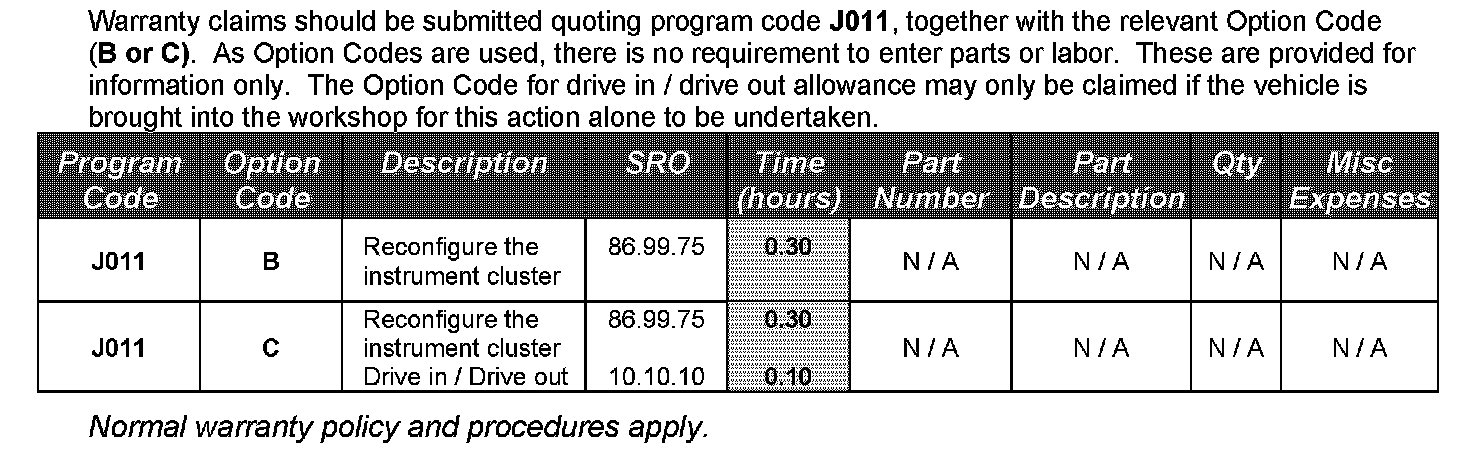
WARRANTY
REPAIR PROCEDURE
RECONFIGURE INSTRUMENT CLUSTER CONTROL MODULE
1. Verify instrument cluster speaker operates correctly and the sound is not distorted.
^ If the speaker is inoperative, diagnose and repair as a separate Warranty claim. In the event the instrument cluster is replaced, ensure this Recall action is 'closed' in DDW.
^ If the speaker operates normally, proceed to step 2.
CAUTION:
A Midtronics PSC-550 Vehicle Power Supply must be connected to the vehicle battery during diagnosis / module programming.
2. Connect the Midtronics PSC-550 Vehicle Power Supply to the vehicle battery.
NOTE:
IDS must be loaded with software release DVD115 Patch File 4 or later.
3. Connect the IDS to the vehicle and begin a new diagnostic session by entering the correct VIN for the current vehicle.
4. Follow the IDS prompts to read the vehicle configuration.
5. Select 'No' when prompted 'Do you wish to read diagnostic trouble codes?'
6. Select 'tick' to continue.
7. Select the 'Vehicle Configuration' tab when Content Model is displayed.
8. From the Vehicle Configuration menu, configure the 'Instrument cluster control module' by selecting from the drop-down menu:
^ 'Module programming' > 'Configure existing module' > 'Instrument cluster control module'
9. Select 'tick' to continue, following all on-screen instructions to complete this task.
^ IDS will return to the Vehicle Configuration menu when completed
10. Exit the current session.
11. Verify instrument cluster speaker operates correctly and the sound is not distorted.
12. Disconnect IDS and the Midtronics PSC-550 Vehicle Power Supply from the vehicle.