Inflatable Restraint Instrument Panel Module Replacement
Removal ProcedureCaution: When you are carrying an undeployed inflator module:
^ Do not carry the inflator module by the wires or connector on the inflator module.
^ Make sure the bag opening points away from you.
When you are storing an undeployed inflator module, make sure the bag opening points away from the surface on which the inflator module rests. When you are storing a steering column, do not rest the column with the bag opening facing down and the column vertical. Provide free space for the air bag to expand in case of an accidental deployment. Otherwise, personal injury may result.
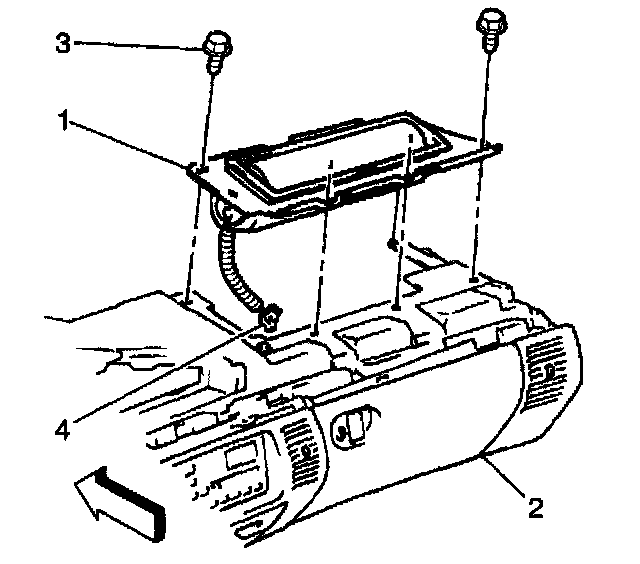
1. Disable the SIR system.
2. Remove the Instrument Panel (IP) upper trim pad.
3. Remove the Inflatable Restraint IP module mounting fasteners (3).
4. Remove the Inflatable Restraint IP module (1) from the IP(2).
Installation Procedure
1. Route the pigtail (4) down through the IP (2).
2. Slide the Inflatable Restraint IP module (1) into the IP opening.
Notice: Refer to Fastener Notice in Cautions and Notices.
3. Install all of the Inflatable Restraint IP module mounting fasteners.
Tighten
Tighten fasteners to 16 N.m (12 lb ft).
4. Install the upper IP trim pad.
5. Enable the SIR system.