Accessory Cellular Phone - Installation
87saab04FILE IN S.I. Man VOL.
SEC. B-9 PG. 7
Service Information
SUBJECT: INSTALLING ACCESSORY CELLULAR PHONES ISSUE: 06/87-971
APPLICATION: 9000 EQUIPPED WITH ACCESSORY GAUGES
Installing a cellular telephone in a 9000 equipped with accessory gauges.
Pages 13 and 14 of the cellular telephone installation manual describe how to install the junction box (for the phone) into the tidy-box of a 9000 dashboard. This is not possible if the car is equipped with accessory gauges.
When installing a phone in a 9000 equipped with gauges, use the procedure below along with the phone installation manual to mount the junction box under the dashboard. The parts and template needed are supplied in the phone kit.
1. Remove the six screws securing the felt panel on the lower right side of the dash and remove the panel.
2. Empty the contents of the glove box.
3. Cut out the template on page 16 of the phone installation manual.
4. Align the template to the back edge and right side of the glove box from under the dash and tape it in place. The template should be positioned so that the edge of the template marked "to top of box" is facing the glove box door.
5. Drill only the 2 holes (3/16" in dia.) marked "for option installations" on the template.
FIGURE 1:
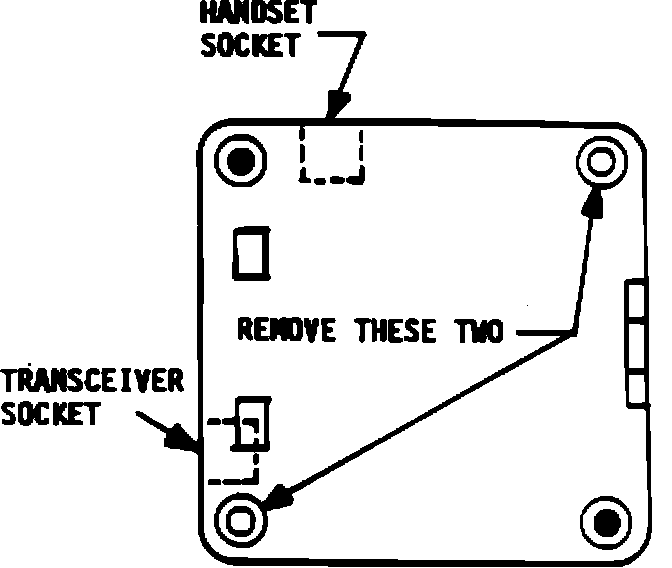
6. Remove the 2 screws from the junction box (see fig. 1).
FIGURE 2:
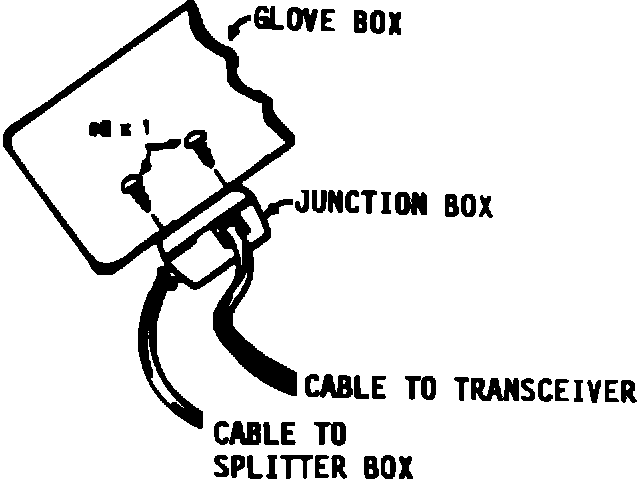
7. Using the 2 #8 x 1" sheet metal screws provided, mount the junction box to the bottom of the glove box. Install the screws from inside the glove box (see fig. 2).
8. Route the control cables to the junction box and connect them as described in the phone installation manual.
9. Cut a 3" x 4" section out of the felt panel, to expose the speaker grille of the junction box when the felt panel is reinstalled.
10. Install the felt panel and the 6 securing screws.
11. Complete the phone installation per the installation manual.