Clutch Disc: Service and Repair
The content of this article/image reflects the changes identified inTSB 18-98-06
Dated 01/18/06
And applies to 2005 Forester & Impreza
Clutch Disc and Cover
REMOVAL
1. Remove the transmission assembly from vehicle body
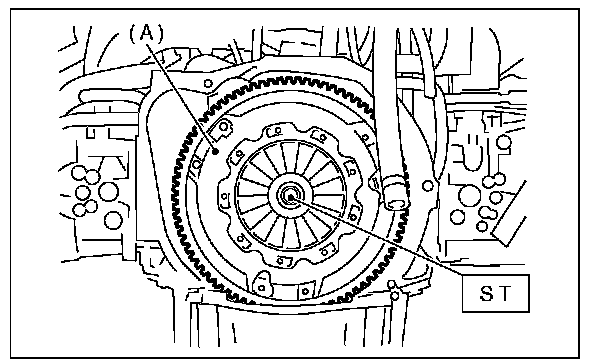
2. Install the ST on flywheel. ST 499747100 CRANKSHAFTSTOPPER
3. Remove the clutch cover and clutch disc.
NOTE:
^ Take care not to allow oil on the clutch disc facing.
^ Do not disassemble either the clutch cover or clutch disc.
INSTALLATION
1. Insert the ST into clutch disc and install them on the flywheel by inserting the ST end into pilot bearing.
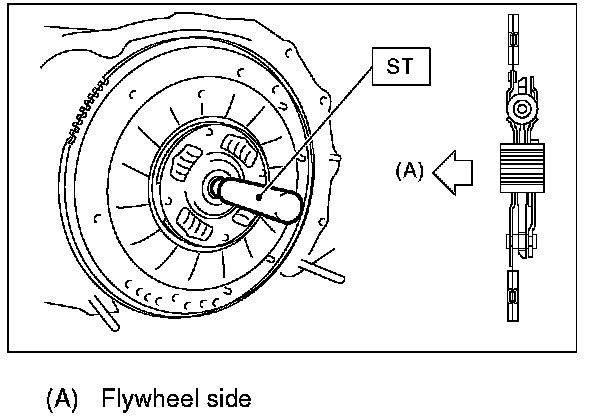
NOTE:
When installing the clutch disc, be careful to its direction. ST 499747100 CLUTCH DISC GUIDE
2. Install the clutch cover to the flywheel and tighten the bolts to the specified torque.
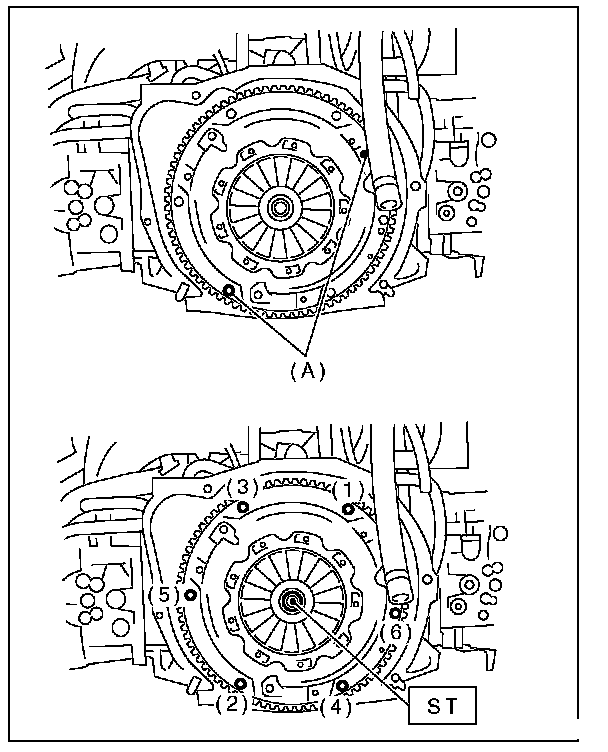
NOTE:
^ When installing the clutch cover to the flywheel, position the clutch cover in order to make the gap between imbalance marks (~ paint mark) of flywheel and clutch cover 120° or more. (The imbalance marks show the residual imbalance direction.)
^ Note the front and rear of the clutch disc when installing.
^ Tighten the clutch cover installing bolts gradually. Each bolt should be tightened to the specified torque in a crisscross order.
Tightening torque: 16 N.m (1.6 kg f-rn, 11.8 ftlb)
3. Remove the ST. ST 499747100 CLUTCH DISC GUIDE
4. Install the transmission assembly.