Radio and Radio Navigation System, Rabbit Sedan
Radio, Multimedia, Navigation
Radio and Radio Navigation System, Rabbit Sedan
Special tools, testers and auxiliary items required
• Trim Removal Wedge (3409)
Removing
• Refer to the correct chapter for the individual unit when removing and installing:
RCD 300 radio system, refer to => [ RCD 310 Radio Connection Overview ] RCD 310 Radio Connection Overview
RCD 500 radio system, refer to => [ RCD 500 Radio Overview ] RCD 500 Radio Overview
Premium Sound System, refer to => [ Premium Sound System ] Premium Sound System
RNS 300 radio navigation system, refer to => [ RNS 300 Radio Navigation System ] RNS 300 Radio Navigation System
RNS MFD 2 and DVD radio navigation system, refer to => [ RNS 510 Radio Navigation System Overview, Rabbit Sedan ] RNS 510 Radio Navigation System Overview, Rabbit Sedan
RNS 510 radio navigation system, refer to => [ RNS 510 Radio Navigation System ] RNS 510 Radio Navigation System
•
Before starting repair work, perform the following:
- If necessary, remove CDs remaining in the unit. Refer to => operating instructions.
- Switch off ignition, switch off all electrical consumers and remove ignition key.
Now, perform the following work procedure:
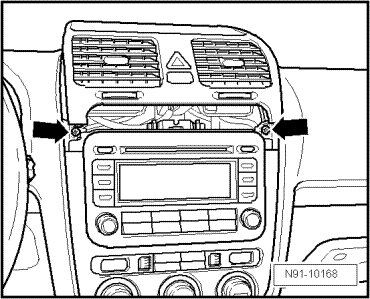
- Remove upper cover with air outlets out of instrument panel center far enough so that radio panel bolts lying beneath are accessible.
- Remove screws - arrows -.
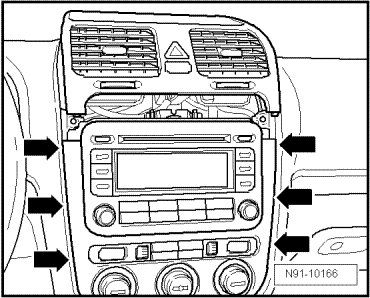
- Using trim removal wedge (3409), carefully pry out cover of center console in area of - arrows - and remove the panel.
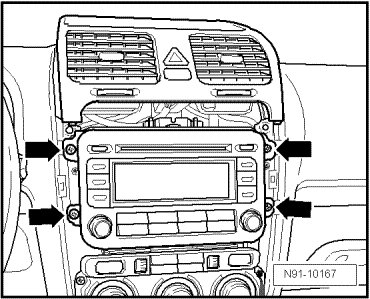
- Remove bolts - arrows - on radio unit.
- Pull radio unit out of installation compartment far enough until harness connectors on rear side of radio unit are accessible.
- Press together the connector lock in direction of - arrows -.
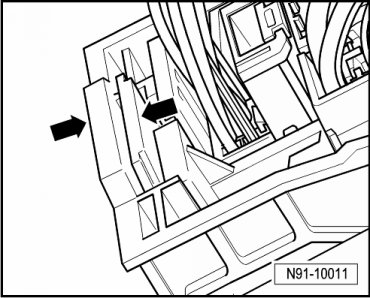
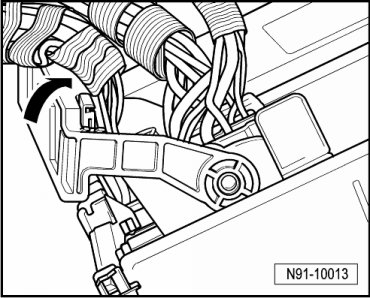
- Then swing mounting bracket up in direction of - arrow - and disconnect harness connector.
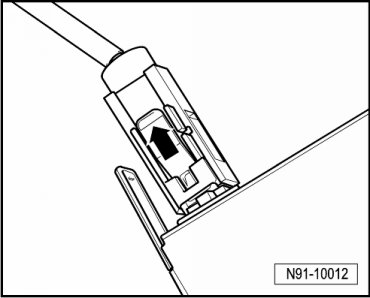
- Disengage harness connectors - arrow - from antenna connections and disconnect them.
Installing
- Connect and engage harness connectors to radio unit.
- Slide radio unit straight into instrument panel.
• While sliding in the radio unit, under no circumstances press on the display or control buttons since the radio unit may be damaged by doing this.
- Secure radio unit with 4 bolts - arrows -.
- Reinstall cover for center console.
- Check coding of radio unit and code radio unit again if necessary.
Radio unit coding, refer to => [ Radio Components, Adapting ] Radio Components, Adapting