Evaporative System Monitor Switch
Evaporative System Monitor Switch
Removing
• Clean the area around the evaporative system integrity monitor switch prior to removal.
- Raise and suitably support the vehicle.
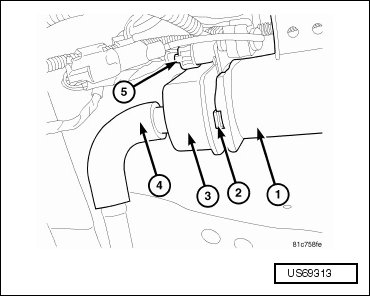
- The ESIM switch (3) is located on the evaporative emission canister (1).
- Disconnect the wiring harness electrical connector (5) from the ESIM switch (3).
- Remove the EVAP canister filter line (4) from the ESIM switch (3).
- Push the lock tab (2) towards the ESIM switch (3) and rotate 1/4 turn counterclockwise in order to remove the ESIM switch (3) from the EVAP canister (1).
Installing
• After installing the ESIM switch, the electrical connector on the switch must be in the 3 o'clock position. This step must be done for proper ESIM switch operation.
- Install the ESIM switch (3) to the EVAP canister (1) and rotate 1/4 turn clockwise until the lock tab (2) engages. Make sure the electrical connector is in the 3 o'clock position.
- Install the EVAP canister filter line (4) to the ESIM switch (3).
- Connect the electrical connector (5) to the ESIM switch (3).
- Lower the vehicle.