Mode 1 - Displaying DTCS
F1
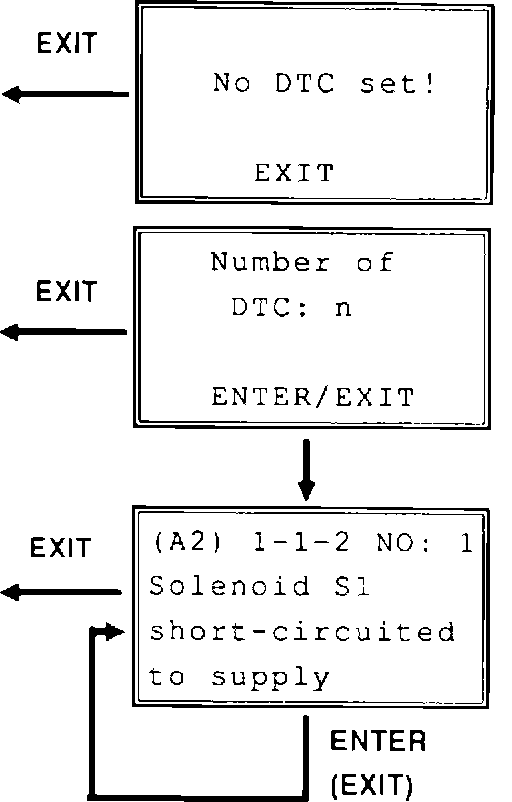
Displaying DTCS.
Indicates if one or more DTCs is stored in memory.
Note:
This does not mean that system is fault-free, only that diagnostic system has not detected a fault.
F2
If DTCs are present, menu first indicates number.
F3
DTCs are displayed in succession each time ENTER is pressed. Reporting recommences from beginning when last DTC has been displayed. If EXIT is pressed at DTC No. 1: Display reverts to test mode selection menu "READ DTC". If EXIT is pressed at DTC No. 2 and up: Previous DTC is displayed. (Example shows menu for Automatic Transmission)
- (A2) in top left-hand corner indicates that adapter is connected to diagnostic unit A, socket 2 (see "Diagnostic unit connections".
- 1-1-2 is flashing code displayed by control module, which is explained in plain text on following lines.
- NO: 1 indicates position of DTC in sequence displayed.
G1
Clearing DTC
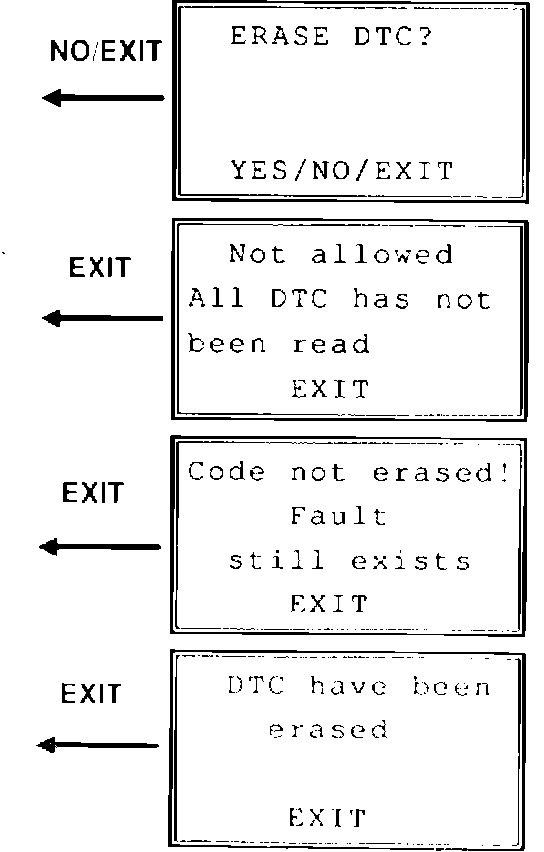
Select YES to clear DTC.
Select NO/EXIT to return to previous menu without clearing code.
G2
Text shown in example appears if all DTCs have not been displayed.
G3
All DTCs have not been cleared. Fault is still present.
Repeat procedure for displaying DTCs to is certain which code is still present.
G4
Message shown at left is displayed when all DTCs have been cleared.